Many people turn to the dark web for privacy and legitimate purposes, but that same anonymity also attracts predators looking for easy targets. As a result, navigating this hidden part of the internet carries serious risks—most notably dark web phishing.
Unlike the crude email scams of the surface web, dark web phishing sites are highly sophisticated. These carefully crafted traps aim to steal credentials, drain crypto wallets, or compromise your anonymity. Knowing how to identify them is not optional—it’s essential.
Drawing on years of research into cybercriminal tactics, this guide breaks down how these scams operate, with real-world examples and practical security tips to help you stay safe. Staying secure on the dark web isn’t about luck—it’s about strategy.
Disclaimer: This article is for educational and informational purposes only. We condemn the use of any technology for illegal activities, including fraud, theft, and unauthorized access.
Why is Dark Web Phishing Different?
Phishing scams on the surface web often rely on urgency and some sloppy grammar like “Your account is locked!” trying to convince you to act quickly. When you do, you fall into their trap. However, the dark web’s a different beast; phishing here is more elaborate and planned by criminals who are more tech-savvy.
The dark web scammers build elaborate fake sites that look like the real thing because they are aware that their targets are cautious and value opsec. They can go as far as mimicking marketplaces you trust, create fake login portals for encrypted email services, and establish an entire phoney community just to gain people’s trust. This makes phishing one of the most technical and dangerous entries on any list of top dark web scams (typical darknet frauds).
Understanding how scammers trick users on the dark web is the first step to avoiding getting scammed.
How Dark Web Phishing Really Works – Exposing the Scammer’s Playbook
In order for you to catch the thief, you’d need to think like the thief — What would they do to evade getting caught? How do they operate?
Dark web phishing scams are made to be more sophisticated because the scammers’ target audience are already wary. So the scammer has to use social engineering and technical deceit tailored to this environment. Let’s take a look at some of their tricks so you’d be in the know and avoid getting fooled by them.
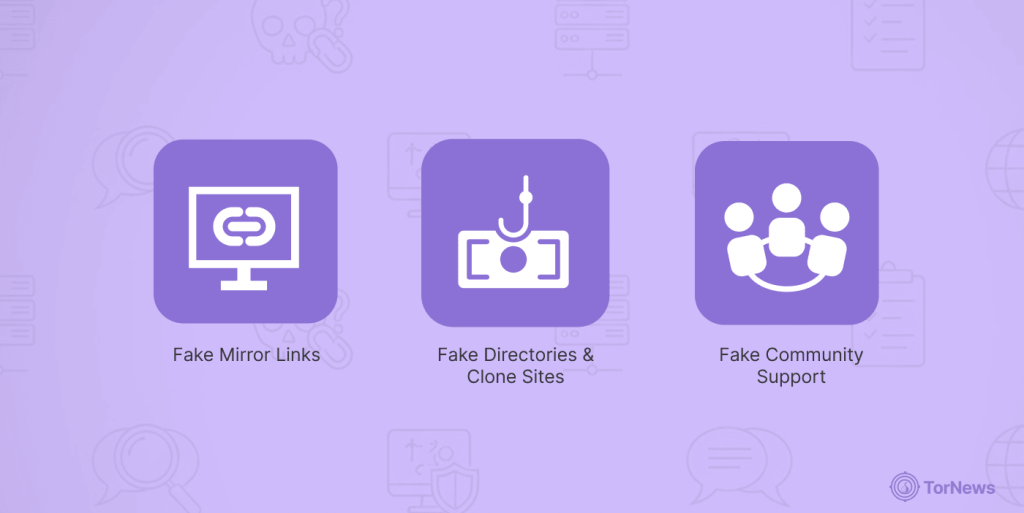
Fake Mirror Links (Typosquatting .onion addresses)
This right here is the most common technical trick they use. The scammers will register addresses that are nearly identical to the legit ones, hoping you’ll mistype or not look closely enough to notice the difference before jumping in. They might change lower case ‘l’ to figure ‘1’ (one), or ‘m’ to ‘rm’.
A legit website may have abcl23def456.onion, while a phishing website might use that exact same address but with one different character: like abc123def456.onion. Just one single letter’s difference and you would probably never even think twice about it, considering everything else is exactly the same as the other site.
Your defense? Manually compare each of the characters of the URL against an address that’s already bookmarked, verified. Make this a habit; it’ll be your saving grace every time.
Fake Community Support
You go on a dark web forum looking for help or a reliable service. Someone responds to your post saying “here’s the official new link” or a user DMs you with ‘the updated address from the admin.’ It looks helpful, but mind you, it’s a hook.
These phishing sites on the dark web are spread through the quasi ‘community’ trust. Trust me, I’ve seen many forum threads where the most ‘helpful’ reply is just a bot pushing a scam link.
Fake Directories & Clone Sites
Here’s where scammers bring their a game:
- Fake directories: These are sites that list verified links for markets, emails, etc., except they are not really giving you the real thing. Sadly, every link you see here only leads to a phishing clone. Such directories are built to rank top when people search for “onion links.” often appearing in results from dark web search engines, which themselves require careful vetting to avoid scams.
- Perfect clones: The scammer not only copies the URL, but goes a step further to mirror the entire website —the login page, the FAQ, the design—everything’s identical. Enter your credentials or send crypto here, and it all goes straight to the attacker. The worst part? You have no way of knowing unless you perform a URL verification.
Dark web phishing scams often trick you into trusting unsafe links from unknown sources. That moment before you land on the page? That’s their golden opportunity.
That takes us to the million-dollar question: how do you spot these dark web phishing sites and scams? You’d have to keep your eyes down to take note of the red flags when they present themselves.
The Phishing Scam Red Flags — Your Instant Phishing Detector
Want to become a superman in detecting phishing scams? Forget the vague hunches — here are more concrete, indisputable signs of a dark web phishing scam.
1. The URL is a Mess (Even for a .Onion Address)
All the real dark web pages have fixed .onion addresses. See a long, jumbled .onion address? Slow down. Phishers often create URLs that look almost right, changing a character with one that looks very similar.
Your move? Don’t click—open a verified directory or official social page yourself and compare every single character in that address manually. Links gotten from a chat room or forum? Never trust those; they’re traps 99% of the time.
2. No Security Basics (PGP, 2FA, HTTPS)
Legit dark web operators often encourage users to use PGP encryption for communication, so if a site or vendor asks you to send plain-text messages or does not have options for 2FA, run because it’s a scam.
No real vendor will request for your password or any sensitive info via an unencrypted channel. Even legit Tor sites use HTTPS, that padlock icon that usually appears in the address bar. If the site you’re trying to visit doesn’t have it, walk away.
3. Requests for Fees or Validation
When you receive a pop-up notification asking you to “verify your account by sending 0.005 BTC here,” ignore it because it’s definitely a phishing attempt. The same applies to a site demanding “escrow fee” before login. No legitimate site will charge a fee or anything of sort either in crypto or fiat to access your account. If you notice such, it’s a direct cash grab.
4. The Site Design Feels
Although dark web sites aren’t particularly known for having beautiful aesthetics, phishing closes often have some subtle flaws. Things like low picture quality, the logo may be blurry, misaligned text, links may be broken., or the layout doesn’t quite match what you remember of the real site.
You know, just a few details off, kind of like the digital equivalent of a cheap forgery. Scammers are often in a rush to deploy these fakes, so there’ll likely be a few details that appear off if you look closely.
5. Deals that Defy Logic
This is pure bait. A seller popped up yesterday with thousands of positive reviews? Not likely. That should tick off the danger alarm in your head. Or offering a flagship product for 90% off? It’s most likely to lure you in.
Scammers like to build fake reputations to create urgency that’ll make you forget to think rationally, make a quick bad decision and play into their traps before you even realize it.
6. Time Pressure
Got a message like “your account is going to be deleted in 24 hours unless you verify HERE”? Such texts are sent to make you panic and make a mistake; just try to be calm and don’t click that link.
How to Stop Dark Web Phishing Before It Starts
Staying safe is not just about spotting scams; you have to actually know how to protect yourself, even before stumbling upon scam dark web sites. Be proactive—that’s the best way for you to keep safe online. Here’s a few tips to build an ironclad posture that’s resistant to scammers:
- Use a disposable environment: Browse inside a virtual machine (VM), use burner emails and dedicated devices separate from your main one. Using a VM is your best containment strategy. Download something nasty? It’s stuck in the virtual machine. After sensitive sessions, just shut it down, delete it, and spin up a fresh one, and you’re golden, like your actual laptop is never touched.
- Harden your Tor Browser: Tune your security level to “safest” so JavaScripts will be disabled (Tor > Settings > Security > Safest). By doing so, you’re closing the doors phishing sites exploit to get to you.
- Never reuse credentials for multiple sites: Toss those your Password123 into the bin, and rather create unique and strong ones for every dark web service you use. Also, get a password manager; it does the heavy lifting for you by creating and saving very hard to guess passwords for all your sites.
- Verify PGP keys: Don’t just chat unprotected, encrypt all correspondence with a vendor’s public PGP key. But first verify the key fingerprint listed on their profile against multiple sources just to be on the safer side.
- Double-check and verify URLs and links: Even if a friend shared it, on more than one trusted directories or privacy forums to be sure they’re not fake ones. If many experienced users confirm the address is legit, it boosts your confidence that you’re actually using the right URL. Be careful of any new user account replying to your query with answers like “yes it’s real.” Trust only established users that have been posting for a long time.
- Be skeptical: When it comes to the dark web sites, never trust anyone or anything, ask questions and verify. Why did they share this link? Is this even a normal request? This opportunity, is it real and does it make sense? Asking questions like this lets you take a moment to think, which can go a long way to prevent you from falling for phishing scam tricks.
- Participating in online forums and communities: It enables you to share knowledge and expertise with one another through reading each others’ experiences regarding phishing incidents. Learning from others’ mistakes helps you avoid falling into similar traps set by bad actors.
- Analyze the onion address pattern: Legitimate sites sometimes use meaningful patterns or vanity URLs. Phishers often use auto-generated .onion addresses. If the address looks completely random and doesn’t match the claimed brand’s typical naming style, double-check it.
Pro tip: You don’t have to be a cybersecurity expert to do a little digging. Spending two minutes on these checks can reveal a scam long before you’re asked to log in. Phishers rely on speed and trust. Remember that. When you slow down and look deeper, their façade often cracks.
Long Term Protection Tips
- Get in the habit of manually checking .onion addresses before you log in or send anything, every single time. It takes only a second, but it’s the single most effective move you can make.
- Scammers adapt real fast; what passed as a convincing phishing site last year may look clumsy today, because their tricks keep evolving. That’s why staying safe means staying curious; follow community discussions, trusted forums and security news to stay in the loop of new trends and keep learning.
- Share what you know with others; when you discover a phishing site, report it to directories and communities. This helps others avoid scams and makes the dark web safer for everyone.
Think You Clicked a Phishing Link? Here’s Your Emergency Protocol
Accidentally clicked a phishing link? Panicking isn’t going to save you; act fast instead:
- Disconnect your internet connection immediately.
- Shut down your Virtual Machine and exit from the Tor Browser.
- Change the passwords for any of the services you accessed using a separate, clean, safe device.
- Monitor your accounts and any linked crypto wallets in case of any unusual activity.
Building Your Safety Net – Tools and Resources
Knowing what to dodge is key. Finding reliable info is also important. You can’t explore the dark web alone; you’ll need good tools and community advice. Here’s how to stay safe.
1. Use Trusted Directories
Think of verified directories as checked lists that keep their links up to date, often focusing on services like dark web markets. Find established ones with a solid reputation. It’s like having a map in unknown places.
- How to use them: Use a good directory as a guide, not something you check daily. One time, find the real .onion address for what you need and save it in your Tor browser. Don’t keep returning to click the link; skip the third party each time.
- Be careful: Even great directories can be hacked or become outdated. A verified link might be a scam today. Double-check info! If a service is on social media or a forum you trust, verify the .onion address there first.
2. Browser Extensions
Thinking about adding an anti-phishing extension? Be careful! The Tor Project warns that the idea of adding extensions to the Tor Browser isn’t safe, the reason being:
- They mess with your privacy: Extensions might get around Tor’s settings, showing your IP address or tracking you.
- They make you overconfident: These extensions only know about listed bad sites. If someone makes a new phishing site on the dark web, the extension won’t catch it. You might stop double-checking URLs, which is super important.
- They might be harmful: You’re adding software to your privacy tool that may be dangerous.
The best thing you can do is check and save URLs yourself.
3. Online Community Forums – Your Heads-Up System
Active dark web communities are where people share phishing attempts as they happen.
Keep up with security threads about scam alerts. Before checking out a popular market, look on the forum for its name plus phishing or scam. You’ll usually find posts with the real URL and many fake ones.
Avoid newly posted “official” links. Don’t click them—verify the link on the forum’s main page instead. Forums are great for info, not so much for links.
Just a heads-up:
- First, trust signed announcements from the service itself.
- Next, see if trusted forum members are talking about the right address.
- Lastly, use a trusted directory as a starting point.
These tools don’t make you safe by themselves. A directory helps you start, while a forum gives you info from other people. Keep your eyes down to detect the warning signs and verify everything first to be safe.
Staying safe on the dark web isn’t about finding some easy trick. It’s more about getting into good habits. Now that you know how to avoid phishing on the dark web in this guide, you’re not just some easy mark; you actually know what’s up.
Every time you double-check a bookmark or turn off a script, you’re doing things the right way. This strong, trust nobody idea is how you really keep yourself safe online. The dark web is not something to play with—don’t trust it at all, and those scammers won’t get their hands on your info.
FAQs
Yes. A phishing site can compromise your system just by being visited. Many run malicious scripts that exploit JavaScript to hijack browsers or install malware on page load. This is why the Tor Project recommends using the “Safest” security level, while a virtual machine adds an essential extra layer of protection.
Be careful with all directories. The only directory you can trust is one you’ve checked out yourself over time, comparing the links to the original sources. Even then, just use it to find the main URL, not as something you use every day to get online.
No—the structure of the dark web and the way .onion addresses work make reliable automated scanning nearly impossible. You are your own best tool. Just be careful and check things regularly.
Use bookmarks! As soon as you know an address is real, save it as a bookmark. This single step eliminates most phishing risk by completely removing scam links.
Using a VPN with Tor is a debated practice and does not directly prevent phishing. A VPN can hide your Tor use from your internet provider, hence is a recommended tool for security online. But it adds no extra protection against malicious .onion sites themselves. In fact, a poorly configured or dishonest VPN could become another point of failure. Your strongest defense remains the habits outlined in this guide such as verifying URLs, using bookmarks, and never trusting unsolicited links (whether you’re using Tor alone or with a VPN).