Online tracking is everywhere. Every search, click, and website visit can be logged and traced back to you through your IP address—especially when using standard browsers like Chrome or Firefox.
Tor Browser was built to change that. By routing your internet traffic through multiple volunteer-run servers worldwide, Tor makes it far harder to track who you are or where you’re browsing from.
But is Tor Browser safe to use? The answer depends on how you use it. While Tor offers powerful anonymity by design, careless settings and user mistakes can weaken its protections.
This article explains how Tor works, clears up common myths, and outlines the key rules you must follow to use Tor safely.
How Does the Tor Browser Work?
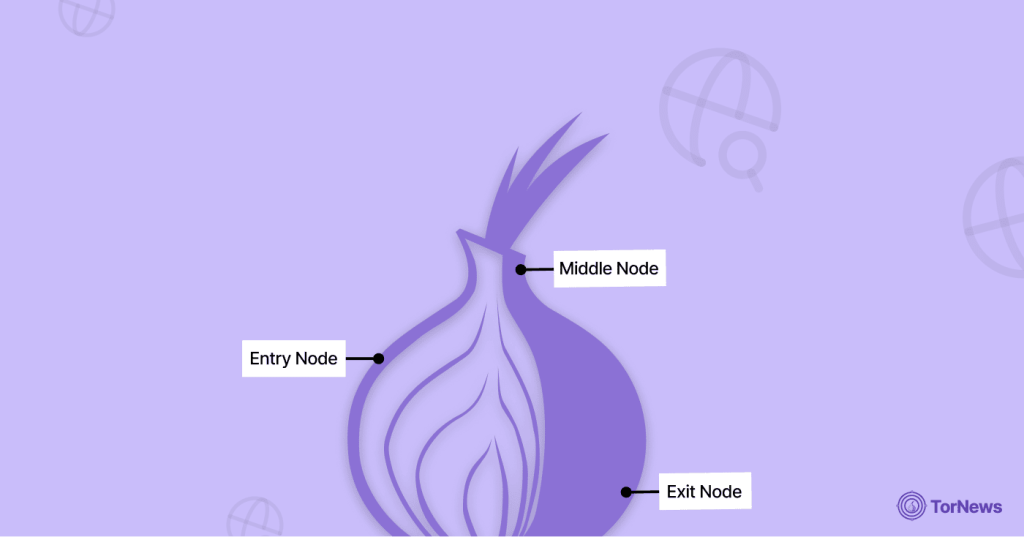
To correctly understand how Tor secures your online identity, you must first grasp its one-in-a-million architecture. Developers designed the ingenious system like an onion, with multiple layers of encryption. This method is formally known as onion routing, the foundational protocol that powers Tor’s anonymity. For a deeper dive into the technical framework, read our detailed guide on what onion routing is.
Once you open the Tor Browser, the process differs completely from a regular browser like Chrome or Firefox. It doesn’t directly transfer your data to Google or whatever search engine you’re using to browse. Instead, it layers your data in numerous encryption layers and sends it through at least three randomized hops, or relays across the network.
The Three-Hop Principle
Tor’s anonymity relies on a chain of volunteer-run Tor nodes. No single node knows both your identity and your destination. Here’s how the three essential relays work:
- The Entry Node: Otherwise called the Guard node, the entry node is the first server your device encounters on the network. Even though it knows your actual IP address, it can’t see the site you’re trying to connect to because multiple layers of encryption conceal your data.
- The Middle Relay: The middle relay node is the most anonymous hop. It doesn’t know your actual IP address (because the Entry Node wraps it), and it can’t tell the location you’re heading to (because the Exit Node conceals it). The function of this hop is to transfer the data along the network.
- The Exit Hop: This node is the last server in the network. The exit node removes every single encryption layer from your connection and transfers your device’s request to the destination site. While the Exit Node knows the site you want to visit, it doesn’t know your actual IP address, but only the Middle Relay’s IP address.
The genius of Tor’s system is that it keeps interactions anonymous such that no single server knows both ends of the communication. This decentralized network model is crucial to its security.
Because of this complex design, malicious actors and authorities can’t even compromise or shut Tor down. It is way superior to using an ordinary VPN service, which is typically governed by one central organisation.
Is Tor Safe?
Tor significantly improves online privacy, but it is not a magic shield. Compared to a normal browser, it’s far safer, yet it introduces unique complexities that a standard connection doesn’t have.
One of Tor’s main weaknesses appears at the final stage of a connection. Before traffic reaches the regular internet, it must be decrypted at a point known as the exit node. This exit node could detect unencrypted data being sent through it by whoever controls it. Users’ activities can sometimes be monitored by malicious actors, surveillance groups, or restrictive governments that operate their own nodes.
So, is Tor dependable and safe? Like any complex piece of software, Tor is not immune to flaws. In the past, vulnerabilities, particularly those linked to JavaScript, have been exploited to expose users’ real IP addresses. For individuals trying to stay anonymous under strict or authoritarian regimes, these weaknesses can pose serious risks if they don’t take proper precautions.
Is Tor Browser Free?
Yes, it is free to download and use. Tor is an open-source project, meaning its code is publicly auditable. You should never pay for the browser itself, as it is completely free to use.
The network relies on a global Tor community of over 7,000 volunteers who operate relay nodes. This infrastructure is supported by the non-profit behind Tor, funded by donations, all working toward the goal of digital privacy and freedom for all users.
This is an enormous undertaking for the organization, but its workforce is made up of people working together for the greater good and not for personal profit.
Is Using Tor Legal and Ethical?
Unlike the sensationalized news, many people mistakenly believe that the Tor Browser is only used by criminals to commit crimes. The reality of the matter is that there are numerous reasons why someone would want to use a Tor browser. You might ask, Is Using Tor Browser Legal? If you are in the US or in many democratic countries, you can legally install and use the Tor browser.
The browser primarily promotes free speech and digital privacy. The non-profit behind Tor is even headquartered in the US, running as a non-profit organization (NPO) that receives support from government and non-government sources. Tor Project focuses on protecting users through accessing the World Wide Web with Freedom and Privacy.
You have the legal right to own and run your own copy of the Tor Browser. However, your access to the Tor Browser does not grant you the legal right to operate on the Tor Network to engage in any illegal activity.
Many people utilize the Tor network to conceal their identity. However, many powerful federal law enforcement agencies are highly motivated and know how to track people committing serious crimes on the Tor network.
Why Do People Use Tor?
People usually associate the dark web with using Tor for illicit purposes, both shady and criminal. But there are numerous positive uses for Tor, including the defense of human rights/freedoms as the key advantages of using this privacy-first browser extend far beyond accessing hidden networks. For many, it’s an essential tool for personal and professional privacy. Here are some of its most legitimate and impactful uses:
- Defending journalists/sources: For news groups and journalism, one key role of Tor is to facilitate secure, anonymous communications between journalists and whistleblowers/source contacts. It is a crucial tool for conducting investigative reporting because most sources won’t speak up if you don’t protect them from retribution.
- Bypassing state censorship: For most ordinary people and people supporting democracy in their government, Tor is the only way to get around state censorship when trying to access restricted political commentaries. Tor enables users to access banned Internet information and social network sites without having to fear government punishment for doing so.
- Vulnerability security: Some individuals, such as victims of domestic abuse or violence, may need to share extremely sensitive details while remaining untraceable when researching support shelters or safe resources. These individuals use Tor to prevent raising suspicion from their assailant on a shared network or computer.
- Corporate protection: It is worth stating that even large corporations use Tor to anonymously perform market research or competitive analysis on rivals without disclosing their corporate IP address. Most companies are careful not to alert their rivals to their interests.
- To hide their identity: At its core, many individuals use Tor to hide their IP address and online footprint from advertisers, data brokers, or general surveillance, seeking basic privacy in their daily browsing.
The Crucial Risks: Where Tor’s Armor Cracks
Although Tor has an impressively strong three-layered armour, there are also multiple weaknesses. The majority of these weaknesses exist at or near the edges of the Tor Network, and most are under user control.
1. The Exit Node Flaw: The Single Largest Threat
When browsing, the Exit Node is the final server on the journey, where the last encryption layer is removed before the data is transferred to the destination server. It is also where the most amount of dangers lie, especially for individuals who aren’t careful about the sites they visit.
Problem: When you browse an old website using the old, unprotected HTTP rather than the modern (HTTPS), the Exit Node receives the traffic totally exposed, as plain text. A sketchy individual facilitating an Exit Node (which is usually a volunteer position) can quickly perform an MITM (Man-in-the-Middle) hack.
Using this form of cyber attack, such operators can easily access any data you transfer, such as login details and passwords. They can even change details like the BTC wallet address to redirect transactions. This is how threat actors loot funds and identities.
Solution $\rightarrow$ proof, the Tor Project has accomplished a great deal toward achieving its involvement in this area, through its enforced onboarding of “HTTPS-Only Mode” (enabled by default) in its web browser.
The Tor Project now requires users to check whether or not the site that they are accessing displays a padlock symbol in the address field and starts with “https://.” If that padlock icon isn’t there, then don’t type any sensitive information there, as your anonymity might be at risk, as well as your sensitive credentials. Also, the web browser’s embedded securities ensure that encryption is always on, but you must be vigilant, regardless.
2. Correlation and Timing Attacks
Although the Tor network uses an extremely decentralized structure, it is not completely immune to highly advanced and well-funded hackers (like some state actors). Any entity that controls a huge portion of the ecosystem can possibly control both the Entry Node and the Exit Node at the same time. Recall, the Entry Node knows your actual IP address, while the Exit Node knows your destination.
Therefore, by analysing the unique patterns moving in and out of the network (the timing of data packets and the actual size), these operators can theoretically confirm those patterns and de-anonymize dark web users.
While this is a huge technical undertaking, it is a notable flaw of the Tor network. If you perform a highly distinctive action (such as signing into a niche forum) at a specific time, attackers can exploit that correlation to expose your location.
3. Malicious Applications and IP Leaks
One other flaw in Tor’s security comes from leveraging apps that neglect its proxy settings. Regardless of the situation, never use external applications (particularly torrent clients) with Tor.
Torrenting apps are terrible for having bad privacy. They usually neglect Tor’s proxy settings and share your actual IP address in tracker requests, which is fundamentally how the torrent protocol works.
The Nightmare: This not only exposes your IP address, but it also immediately breaches your anonymity. It further transfers a myriad of data through the Tor ecosystem, slowing the service for every connected user. It is extremely bad for the full volunteer network, and you must ensure to avoid this for both your network’s health and your safety.
Not only does this leak your real IP address, instantly compromising your anonymity, but it also sends a flood of data through the Tor network, drastically slowing down the service for everyone else. This puts a heavy strain on the entire volunteer network, so you should avoid it entirely to protect both your safety and the network’s health.
If you’re using Tor as part of your work that involves any sensitive information, have you considered whether or not other programs that you run in conjunction with Tor could be exposing your actual physical location without your knowledge?
Is Tor Browser Safe without Using a VPN?
The debate over Tor and VPNs centers on a fundamental question of trust. To understand the critical difference between Tor and a VPN, consider the core question of trust: do you rely on a decentralized volunteer network or a centralized commercial service for anonymity?
Enthusiasts argue about how we assess what is private on the internet; namely, trust and the technology used to create an anonymous browsing experience.
As an internet user, you may also find some discussions about whether it is better to support a VPN company that provides services from one centralized location or to rely on a peer-to-peer network such as Tor.
This fundamental choice between a decentralized anonymity network and a private tunnel service is explored in detail in our comprehensive Tor vs VPN comparison.
The Case for Tor Alone (Trust the Network)
For many Tor purists, a VPN establishes a single, reliable, centralized entity that confirms two things: your actual IP address, and the fact that you’re visiting Tor. They believe that using a decentralized, volunteer-operated network is essentially safer and more reliable than using a profit-seeking firm. They further argue that VPN services could encounter logging demands, subpoenas, or collapse.
These purists say that very powerful adversaries can target the centralized failure point—the VPN service first, if they want to compromise you. However, a decentralized worldwide volunteer network runs the Tor ecosystem, making it much harder to trace your activities or shut down operations.
The Case for VPN Over Tor
Experts recommend this setup as the best way to maximize protection against local entities that censor or monitor your actions.
To set this up, first connect to a reliable Virtual Private Network (VPN) service like NordVPN, Tor-compatible servers, etc. Once connected, go to Tor.
The Value: This establishes several protection layers:
- Conceals your Tor usage history from your ISP: Usually, your ISP knows when you visit a Tor Entry Node, but they can’t tell what exactly you’re doing. When you first use a VPN, your ISP sees only encrypted data going to the VPN server—they can’t tell whether you’re connected to Tor.
- Secures the Entry Node: Also, this safeguards your device’s actual IP address from operators in the Entry Node, and adds an additional protection layer against correlation and timing hacks.
- Bypassing restrictions: Numerous Internet Service Providers (ISPs) and oppressive regimes are openly restricting people’s ability to connect to commonly-used Tor Entry Nodes. A VPN can provide you with an easy way to circumvent these types of restrictions so that you can enjoy the full benefits of the Tor network.
When to Use It: If you reside in a highly-censored area or if you often experience ISP restrictions or discussions regarding your connections with Tor, a good time to use this service would be.
How to Use Tor Browser on Different Devices
The most critical rule is to download the official Tor Browser only from the official website of the organization (torproject.org).
If you download from anywhere else, you risk getting malware disguised as the Tor software. Once you have your Tor Browser downloaded from the official website, the next step is installation:
Desktop (Windows, macOS, and Linux)
- Installation: You will need to find the appropriate version of the installer on the official website. The installation of the Tor Browser does not integrate deeply into the operating system like many applications; it installs as a separate folder, usually placed on the desktop.
- Connecting: When the user launches the program for the first time, they will see a small pop-up window with a prompt. For the vast majority of users, simply pressing the “Connect” button will create an anonymous Three-Hop Circuit. There is a small bar-like display that will pop up to indicate the progress of the connection.
- Censorship: If you are in a country that actively censors or blocks Tor, the regular “Connect” option may not work for you. If this happens, click “Configure Connection” and set up a bridge.
Bridges are secret relay points that help users bypass government restrictions, making it hard for Internet service providers to find and block them.
Android
Is it safe to use the Tor Browser on an Android device? Yes, the official Tor Browser app for Android is safe to use. You can download the authentic version from the Google Play Store or F-Droid, as it is maintained directly by the Tor Project.
Downloading apps through these channels ensures you are using legitimate versions of the app, assures you of the integrity of the source code, and helps protect you from malicious versions of the app.
iOS (The Catch)
If you are an iOS user (for example, with an iPhone or iPad), you will face problems. Apple’s development rules require that all browsers use the WebKit engine, which limits the required privacy controls that the Tor Browser needs to function. Due to this unexpected limitation, the Tor Project does not provide an iOS version of the Tor Browser.
They suggest using an application known as Onion Browser. While it is an open-source application with support for routing through Tor, you should know that its level of security will not be as strong as that of either the PC version or the official Android version due to restrictions by the Apple operating system.
How Do I Remove Tor Browsers from My Computer?
Because Tor Browser is designed to be highly portable and avoids deep integration with your computer, you can remove it quickly and thoroughly. There is no need to use an elaborate uninstall tool:
- Find: Locate or browse the folder or program where you downloaded the Tor Browser (standard preference download location of ‘Desktop’).
- Erase: You can delete the complete Tor Browser program or folder from your device.
- Empty trash: To ensure that no further data remains on your computer, you should also recycle bin.
Is Tor Safe for Dark Web Browsing?
The connection between Tor and the dark web is often misunderstood. When people ask, “Is Tor safe?” they are frequently asking, “Is it safe for accessing the dark web?” To understand risk, it helps to distinguish between the two concepts. For a foundational understanding of this hidden part of the internet, including how it differs from the deep web and its common uses, start with our dark web 101 guide.
The internet is massive, far larger than what Google indexes. The internet splits into two parts: the deep web and the dark web. Both of these make up a small percentage of all web-based content on the Internet.
Approximately 90% of the deep web consists of private, password-protected servers like databases and medical portals. The dark web, a small subset, refers specifically to sites on the dark web that are intentionally hidden and require software like Tor to access. Tor is the necessary tool for finding this hidden space. For a detailed look at other browsers that can access this part of the internet, see our guide on the best dark web browsers. It’s short (reletively), clear, and punchy.
The Inherent Security of .onion Services
When you connect to a standard website (a clearweb site), your traffic must leave the Tor network at the Exit Node. But here is a bonus perk of using an onion site: the connection stays entirely within the encrypted Tor network.
Because the circuit never exits the encrypted system, there is no exposed Exit Node vulnerability, making communication with these hidden services inherently more secure from a technical standpoint than visiting a regular website using Tor.
The Real Danger
While you might wonder whether Tor is technically safe for accessing the dark web, the greatest risk actually comes from the environment surrounding it. Within the dark web, a person may find a variety of scams, illegal content, malicious documents, and dubious organizations.
Among the most common and financially damaging threats are exit scams, where marketplaces or vendors vanish with users’ funds. We explain exactly how these work in our guide to what an exit scam is.
While the same anonymity that provides you protection also provides protection to actors on the internet. Because of this, you should treat anything you download from an unfamiliar site with care.
Phishing attacks, both through email and other forms of communication, are things that you should be mindful of. This is important because attackers can use them to take over computers or create hyperlinks that lead to insecure websites. While the Tor network is strong, most users in the ecosystem are there for illegal activities.
Conclusion
Tor is generally safe when used correctly. In essence, the Tor browser is safe for protecting your privacy from trackers, your ISP, and pervasive online surveillance. For maximum security, experts often recommend using Tor with a VPN. This setup hides your Tor usage from your ISP and adds an extra encryption layer before your traffic enters the anonymity network.
If additional security is not an issue for you, simply access Tor directly, always enforce HTTPS connections by looking for the padlock icon, and never log in to any of your public accounts or download files that have not been verified using your primary operating system.
You can easily make Tor into a strong shield for your digital security, and you will be able to successfully integrate it with your existing security strategy as long as you follow these non-negotiable rules.
FAQs
In most countries, using Tor to access the dark web is legal—the problem isn’t access, but activity. Law enforcement actively monitors the Tor network and can identify users involved in serious criminal acts.
Tor encrypts your data, then wraps it in multiple layers before sending it through a randomized path of relays. Your connection speed slows down in the process. The browser prioritizes anonymity over speed, again, by routing traffic through multiple encrypted, geographically dispersed relays. The added latency is the trade-off that helps prevent de-anonymization through timing analysis.
Yes, Tor is legal in most countries, including the U.S., as it’s primarily a privacy tool. Tor is designed to operate securely on its own, though a VPN can further hide your activity from your ISP.